
Roblox is a popular game, but installing it can be a hassle. Sometimes, you just want to play without waiting for downloads or updates.
With now.gg Roblox, you can play directly in your browser. No need to install anything. Just click and start playing.
This method is great for school or work computers where downloads are blocked. It also helps if your device doesn’t have much storage.
However, some users face issues like the game not loading or login problems. In this guide, we’ll show you how to fix these problems and enjoy Roblox studio smoothly on now.gg.
2. How to Use now.gg Roblox in 2026
Using now.gg Roblox in 2026 is simple and convenient. Here’s how you can start playing Roblox directly in your browser without any downloads:
- Open your browser and visit the now.gg website.
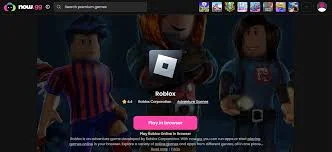
- Search for “Roblox” in the search bar, or you can go directly to the Roblox page on now.gg.
- Once you find Roblox, click on “Play in Browser.”
- The game will load right in your browser. You can log in to your Roblox account or create a new one.
- Now you’re ready to start playing your favorite Roblox games.
This method works for most devices, including PCs, laptops, and even Chromebooks. It’s a great option for people with limited storage or if you can’t install apps on your device. All you need is a stable internet connection.
If you run into issues like the game not loading, try refreshing the page or clearing your browser cache. Sometimes, using a different browser can help too.
Is now.gg Roblox Unblocked at School or Work?
If you’re trying to play now.gg Roblox game at school or work, you might run into some restrictions. Many schools and workplaces block gaming sites to prevent distractions. However, if you find now.gg Roblox blocked, here are some ways you might be able to access it:
Use a VPN
A VPN can help you bypass network restrictions by masking your real IP address. When you use a VPN, your device connects to the internet through a different server, allowing you to access blocked websites, including now.gg Roblox.
Try a Proxy Server
A proxy works similarly to a VPN, but it routes your internet traffic through a different server. This can also help you access Roblox if it’s blocked.
Switch to Mobile Data
If the Wi-Fi network is restricted, using your mobile data can give you unrestricted access to now.gg Roblox.
Remember, bypassing network restrictions may violate your school or workplace’s policies. Make sure you are aware of the rules before trying to unblock any websites.
now.gg Roblox Not Working: Fixes and Real Solutions
When now.gg Roblox pc isn’t working, it can be frustrating, but there are a few things you can try to get it back up and running.
1. Check Your Internet Connection
First, make sure your internet is stable. Slow or intermittent connections are common causes for game loading issues. Test your Wi-Fi or mobile data connection by visiting a website or streaming a video. If things are slow, try restarting your router or switching to a more reliable network.
2. Clear Your Browser Cache
Browsers save data to load websites faster, but over time this can cause problems. To clear your cache:
- Go to your browser settings.
- Click on “Privacy & Security.”
- Select “Clear browsing data.”
- Make sure “Cached images and files” is selected.
- Click “Clear data.”
This should help resolve loading issues.
3. Try Incognito Mode
Sometimes, browser extensions or settings interfere with now.gg Roblox. To avoid this, open a new Incognito or Private window in your browser. This will disable extensions and may solve the problem. Visit now.gg Roblox in this mode to see if it works better.
4. Use an Updated Browser
Ensure your browser is up to date. now.gg Roblox online play works best on Google Chrome, Mozilla Firefox, and Safari. If your browser is outdated, update it to the latest version. If you’re still having issues, try switching to another supported browser.
5. Disable VPNs or Proxies
If you’re using a VPN or proxy, it may cause connection problems. Disable them and try accessing now.gg Roblox again. Sometimes, even without an active VPN, background services can use one, which may cause issues. Be sure to check if any background apps are using a VPN.
6. Contact Support
If none of these steps work, it’s time to reach out for help.now.gg Roblox has a support option built into the platform. Look for the “?” icon in the game window, then click on “Report a Problem.” Provide a clear description of your issue. You can also email [email protected] for further assistance.
By following these solutions, you can fix common issues with now.gg Roblox and get back to enjoying your game.
What Games Can You Play on now.gg Roblox?
On now.gg Roblox, you can enjoy a wide variety of games directly through your browser. This means you don’t need to download anything to start playing. The platform offers a seamless gaming experience across multiple genres, making it a great option for Roblox fans.
Popular Games Available
- Blox Fruits: A thrilling action game where you train to become the strongest fighter.
- Brookhaven RP: A popular role-playing game where you can live your life in a virtual city.
- Adopt Me!: A family-friendly game where you can adopt and care for pets.
- Murder Mystery 2: A classic mystery game where players use their deduction skills to solve crimes.
- Tower of Hell: An obstacle course game that challenges your parkour skills.
- Evade: A survival game where you have to escape dangerous situations.
- BedWars: A strategy game where teams defend their beds and try to destroy others.
- Jailbreak: A cops-and-robbers game where you escape from prison or chase down criminals.
- Welcome to Bloxburg: A life simulation game where you design and build your dream house.
- DOORS: A creepy horror game where you must solve puzzles to escape different rooms.
These games provide a broad range of experiences, from role-playing to action-packed challenges. Whatever genre you enjoy, there’s something for you on now.gg Roblox.
now.gg Roblox Alternatives (Safe & Working in 2026)
If you’re looking for other platforms likenow.gg Roblox, there are several alternatives in 2026 that offer a similar cloud gaming experience. These services provide great options for gaming without the need for powerful hardware.
1. NVIDIA GeForce NOW
NVIDIA GeForce NOW allows you to play PC games in the cloud, supporting a variety of popular games. You can access high-quality gaming from multiple devices, including laptops, phones, and even smart TVs. It has a free plan, but premium plans offer enhanced features like priority access and higher streaming quality.
2. Shadow PC
Shadow PC gives you a complete virtual Windows PC in the cloud. It allows you to run games and software as if they were on your own computer. While it requires a subscription, it’s an excellent choice for those who need a powerful cloud-based setup for gaming or other tasks.
3. Blacknut
Blacknut is a cloud gaming service with a wide range of games, from action titles to family-friendly games. It’s available on various devices, including smartphones, tablets, and smart TVs. Blacknut requires a subscription but offers an extensive library to choose from.
4. CrazyGames
CrazyGames is an online platform offering a variety of free-to-play games directly in your browser. It’s an excellent alternative for casual gamers, with games in multiple genres, including action, puzzle, and adventure. No downloads are needed, and you can jump into any game in seconds.
5. Cartridge
Cartridge is another cloud gaming service that lets you play games without downloading them. It offers a broad selection of titles and supports instant access, meaning you can start playing right away. The platform provides a great experience on both desktop and mobile devices.
These alternatives are all safe and reliable options for gaming in 2026. Depending on your needs—whether you want a large game library or high-performance streaming—one of these services might be the perfect fit for you.
now.gg Roblox Links: How to Find Real Ones
If you want to play Roblox onnow.gg, it’s essential to find the right links. Stick to official and well-known sources like thenow.gg website. This helps you avoid harmful links that might lead to scams or unsafe content.
Here are a few tips to help you:
- Visit only trusted websites.
- Avoid third-party sites that aren’t officially recognized.
- Always check the URL to ensure it’s correct and secure.
By following these steps, you’ll be able to safely access Roblox onnow.gg without any worries.
Is Playing Roblox on now.gg Safe and Legal?
Using now.gg to play Roblox is generally safe, but there are a few things you need to keep in mind. First, make sure you’re accessing the platform through legitimate links. By doing so, you avoid the risks of malicious websites.
As for legality, playing Roblox on now.gg doesn’t break any rules as long as you’re using the platform properly. Always respect Roblox’s terms of service and avoid any actions that might violate their guidelines.
Staying on the right side of the law and using trusted sources will ensure a smooth experience.
Last Words
In 2026 ,now.gg offers a convenient way to play Roblox without downloading anything. It’s especially useful if you don’t want to use up your device’s storage. However, it’s important to be cautious about where you get your links. Stick to secure, reliable sources to keep your experience safe and enjoyable.
If you’re looking for a hassle-free way to play Roblox online,now.gg is definitely worth considering, as long as you’re careful about safety.