

Accessing your Grow Therapy 2026 account should be straightforward. However, many users encounter issues like forgotten passwords, browser errors, or trouble finding the correct login page. These obstacles can delay therapy sessions and add unnecessary stress.
This guide provides clear, step-by-step instructions to help you log in successfully. Whether you’re a client or a provider, you’ll find solutions to common problems and tips to ensure a smooth login experience.
What is Grow Therapy?
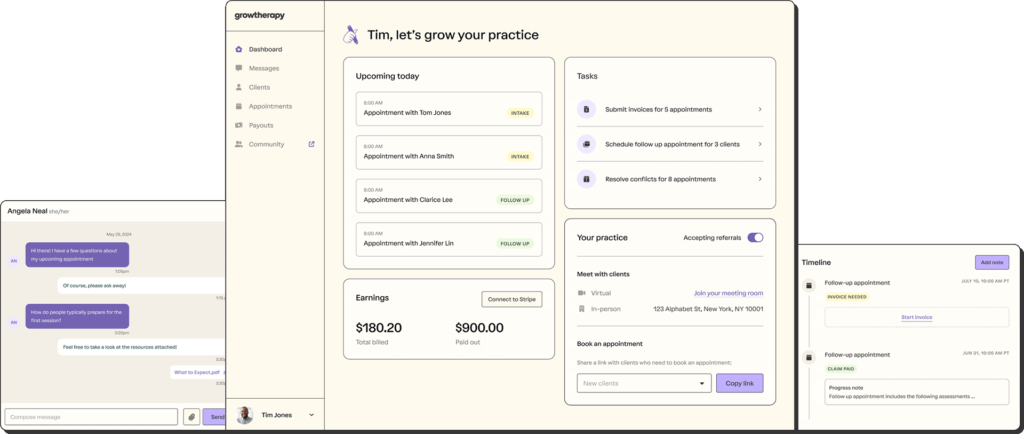
Grow Therapy is an online mental health platform that connects clients with licensed therapists across the United States. It offers both virtual and in-person therapy sessions, making it easier for individuals to access mental health care from the comfort of their homes or in a traditional setting.
The platform is designed to simplify the process of finding a therapist who accepts your insurance and meets your specific needs. Users can filter therapists by state, insurance provider, and areas of specialization, ensuring a personalized match.
Security and privacy are top priorities for Grow Therapy login. The platform complies with the Health Insurance Portability and Accountability Act (HIPAA), ensuring that all personal and health information is handled with the utmost care. This includes secure messaging tools and encrypted data storage, providing peace of mind for users concerned about confidentiality.
Grow Therapy Login: Step-by-Step Guide
You can log in to your Grow Therapy account in just a few steps. This guide works whether you’re using a computer, phone, or tablet.
Step 1: Go to the Official Login Page
Visit the Grow Therapy login page. This is where you’ll sign in to your account. Use this link:https://help.growtherapy.com/clients/en/articles/9541640-log-in-to-grow-therapy
Step 2: Choose Your Login Method
There are two main ways to log in:
- If you made your account using your email and password, enter them in the boxes.
- If you signed up with your Google account, choose the “Sign in with Google” option. Pick the Gmail address you used when you registered.
Step 3: Complete Two-Step Verification
If you’ve set up two-step verification, you’ll get a code. Enter that code to finish logging in. This extra step helps keep your account safe. You only need to do it if you turned on this security feature.
Can’t Log In? Common Issues and Fixes

If you can’t log in, don’t worry. Many login problems are easy to fix. Here are the most common ones and how to solve them.
1. You’re Using the Wrong Login Method
If you signed up using Google, don’t try to log in with an email and password. Always use “Sign in with Google” in that case.
2. You Forgot Your Password
Click “I forgot my password” on the login screen. You’ll get an email to reset it. Check your spam or promotions folder if it doesn’t show up in your inbox. If the email still doesn’t arrive, try adding “growtherapy.com” to your safe sender list.
3. Your Browser is Causing Problems
Grow Therapy address works best on updated browsers like Chrome, Safari, Firefox, or Edge. Clear your browser’s cache and cookies if the page isn’t loading correctly.
4. Your Internet is Unstable
Try switching to another Wi-Fi network or using your mobile data. This helps check if your connection is the issue.
5. Two-Step Code Isn’t Coming Through
If you lost access to the device that gets the login code, you’ll need to contact Grow Therapy support. They’ll verify your identity and help you log in again.
6. Check If Grow Therapy is Down
Sometimes the issue is on their side. You can check their system status at:https://status.growtherapy.com
If none of these work, reach out to their support team for help. They can guide you through any account issue.
How to Register for a Grow Therapy Account

To create a Grow Therapy account, you must first book a full appointment with one of their providers. Just talking to someone in a short consultation won’t create your account.
Step 1: Book Your Appointment
Go to the Grow Therapy psychiatrist website and schedule a full session. Use your real email when booking. This is important because your account will be linked to it.
Step 2: Wait for Your Email
Once your appointment is confirmed, you’ll get an email. This email includes a link to your client portal.
Step 3: Activate Your Account
Click the “Login to my portal” link in the email. On the login page, look for “First time here?” Click “Activate your account.” You’ll be asked to create a username and password. Then, check your email again for a verification message. Click “Verify my account” to finish setup.
Using Google to Register?
If you booked using a Gmail address, you can sign in with Google instead. On the login page, choose “Sign in with Google,” and follow the steps. Your client portal will open once you finish.
Make sure you always use the same email when booking and logging in. This helps avoid any mix-ups with your records.
For extra guidance, you can also check the official help article here:https://help.growtherapy.com/clients/en/articles/6408690-activate-your-client-portal
Benefits of Using the Grow Therapy Portal
The Grow Therapy portal provides several benefits that make it easier for you to manage your therapy sessions, whether you’re a client or a provider.
For Clients:
- Find the Right Therapist: The portal makes it easy to search for a therapist based on your needs. You can filter by location, specialty, and even insurance, helping you find the best fit for you.
- Secure Communication: You can safely message your therapist directly through the portal, ensuring that all your conversations remain private.
- Convenient Telehealth: With the option to attend therapy sessions from home, the portal offers an easy way to access care, especially if you prefer not to travel.
- Manage Appointments: You have full control over your appointments. You can schedule, reschedule, or cancel sessions whenever you need.
For Providers:
- Streamlined Practice Management: The portal helps therapists keep track of clients, appointments, and billing all in one place, reducing time spent on administrative tasks.
- Professional Development: Providers can access tools for continued education, helping them stay up-to-date with the latest in therapy practices.
- Insurance Billing Support: Grow Therapy helps with insurance billing and credentialing, so providers don’t need to manage these tasks separately.
- Financial Tools: Providers get access to services like business banking and accounting software, making it easier to manage finances.
Is Grow Therapy Login Safe?

Yes, your security is a top priority when using the Grow Therapy portal.
1. HIPAA Compliance
The platform follows strict guidelines to protect your personal health information, ensuring that everything stays private and secure.
2. Strong Login Security
The login process is protected with encrypted passwords, and you can even use Google authentication for extra safety.
3. Two-Factor Authentication
To make sure no one can access your account without your permission, Grow Therapy offers two-factor authentication. This adds another layer of security.
4. Encrypted Data
All data, including messages and video sessions, are encrypted, so you can feel safe sharing sensitive information.
5. Secure Telehealth
If you’re using the platform for remote therapy sessions, these are protected with secure connections, ensuring your conversations stay private.
If you face any issues while logging in or with your account, you can easily reach out to Grow Therapy’s support team for assistance. They are available to help with any login problems you might encounter.
Mobile Access: Grow Therapy Login on Phone
You can easily access your Grow Therapy account on your phone using a mobile browser. To do so, just open your browser, visit the Grow Therapy login page, and enter your credentials. The platform is designed to work smoothly on mobile devices, so you can manage appointments, chat with your provider, and access resources wherever you are.
Currently, Grow Therapy does not have a dedicated app, but the mobile-optimized website makes it easy to use on phones and tablets. This means you don’t need an extra download—simply log in through your browser.
Support for Login Problems: Who to Contact
If you are having trouble logging into your Grow Therapy account, follow these simple steps to resolve the issue:
1. Check for Platform Issues
Sometimes the platform may be experiencing temporary issues. You can visit the Grow Therapy status page to see if there are any known problems.
2. Reset Your Password
If you can’t remember your password, you can easily reset it. Just go to the login page, click on the “Forgot Password” link, and follow the instructions to receive a reset link via email.
3. Clear Your Browser Cache
Clearing your browser’s cache and cookies can help resolve login problems that may be caused by outdated data stored in your browser.
4. Try a Different Browser or Device
If the problem continues, try using a different browser or device. Sometimes, the issue may be related to specific browser settings.
5. Contact Support
If none of the above steps work, don’t hesitate to contact Grow Therapy’s support team. You can reach out to them by visiting the support page in your client portal.
For Client Support: Log in to your client portal and use the “Help” widget to submit a support request.
For Provider Support: If you are a provider, you can log in to your provider portal and use the “Help” widget there.
Grow Therapy’s support team is available Monday through Friday from 9 AM to 9 PM ET. They typically respond within one business day, so you won’t have to wait long to get the help you need.
If you need further assistance, you can also contact Grow Therapy directly via email at [email protected] or by calling 786-755-1863.
FAQs About Grow Therapy Login
1. Is Login Free for Users?
Yes, logging into your Grow Therapy account is completely free. You can access your account whenever you want to manage appointments, send messages to your provider, or check your therapy progress.
2. Can I Use the Same Login on Different Devices?
You can use the same Grow Therapy login on different devices. Whether you’re using your phone, tablet, or computer, your login credentials will work across all platforms. This gives you flexibility to access your account anywhere.
3. How Do I Change My Email or Phone Number?
Changing your email or phone number on Grow Therapy is simple. Just follow these steps:
- Log in to your account.
- Go to your profile settings.
- Look for the “Update Contact Info” option.
- Enter your new email or phone number and save the changes.
If you have trouble updating, you can always contact support for assistance.
4. What Happens if I Stop Therapy—Does My Account Close?
If you stop therapy, your Grow Therapy account will not close automatically. You can leave the account active if you plan to return later. If you want to close it, contact support to request account deactivation. Keep in mind that your records will stay accessible unless you choose to delete them.
Last Thoughts
Using Grow Therapy is a straightforward process. You can log in easily, manage your account, and get support whenever you need it. If you ever run into any problems, customer support is just a message away. Follow the steps outlined in this guide, and you’ll be able to access your therapy sessions without hassle.
